
Dear players,
Due to the upcoming shutdown of the EN servers of Rise of Angels, all EN players can continue their journey on the RU servers.
To make this transition smoother, we will offer EN players rewards corresponding to their current progression, including diamonds, VIP points, gold, equipment, skins, and more.
Step 1
FOLLOW THIS LINK to access the Rise of Angels RU servers.
Step 2
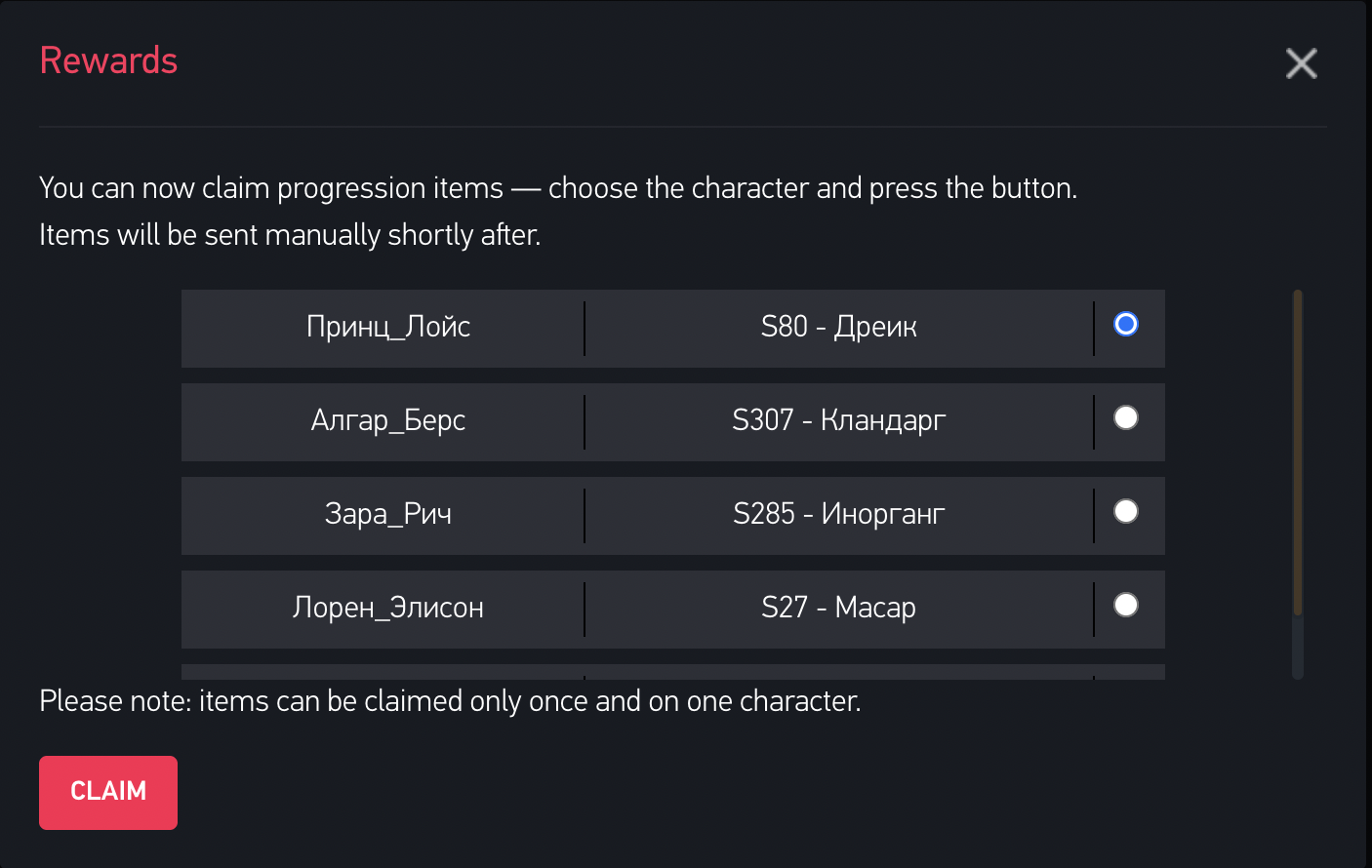
Create a character on any RU server and start playing. After some time, you will see the following pop-up:
Step 3
Choose the character that will receive the items and privileges.
If you are not sure yet which character or server to choose, feel free to continue playing. Simply close the window using the cross icon in the upper-right corner of the pop-up. Don’t worry — the window will appear again from time to time until you make your choice.
Step 4
Click the "Claim" button. The items and privileges will be sent to the selected character shortly afterward.
Please note that this process is handled manually and may take some time due to additional verification.
Important notes
- Please use the link from Step 1 to access Rise of Angels RU at least once, otherwise the pop-ups may not work correctly.
- This pop-up system will remain available for some time after the shutdown of the EN version of the game on March 15. Even after that, you may contact us through our official Facebook groups to receive your items and privileges on the RU servers.
All the best,
CreaGames Team